PaperScan Scanner Software Pro Edition3.0.67
Publisher Description
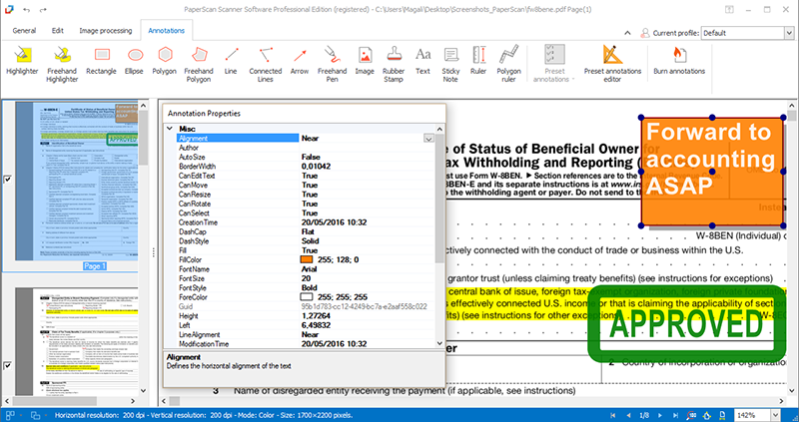
PaperScan scanner software Professional Edition allows you to scan, process, annotate, compress and save as a single file or multipage files your images and documents. It is the most complete edition of the PaperScan line of products created by ORPALIS, providing professional and end-users with all features needed in document (image and PDF) acquisition, processing and efficient storage domains.
PaperScan is universal because it can control any scanner (TWAIN or WIA) including network scanners, cameras or acquisition cards.
Various formats are supported, including PDF/A, PDF/OCR, TIFF, JPEG, JPEG 2000, PNG and JBIG2.
Image processing is available during batch acquisition (auto-deskew, angle rotation, borders removal, punch holes removal, negative) and once the document is acquired (color adjustment, color space conversion, effects, filters, crop and more).
The option to recognize characters (OCR) is enabled in this version.
The Automatic Color Detection feature reduces the size of the documents saved without any quality loss, which is an advantage for storing and sharing purposes.
A large variety of annotations is supported: arrow, highlighter, freehand highlighter, sticky note, rubber stamp, text, image, rectangle, line, connected lines, ellipse, ruler, polygon, freehand polygon, and freehand pen.
Other functionalities include: unlimited batch TWAIN WIA scanning/import, PDF Encryption support (read write), flatbed and document feeder support, duplex scanning support automatic blank page removal and Quick Scan Mode (with the Ctrl + Q keys).
About PaperScan Scanner Software Pro Edition
This program is available in English, French. It was last updated on 29 September, 2026. PaperScan Scanner Software Pro Edition is compatible with the following operating systems: Windows.
The company that develops PaperScan Scanner Software Pro Edition is ORPALIS. The latest version released by its developer is 3.0.67. This version was rated by 15 users of our site and has an average rating of 3.1.
The download we have available for PaperScan Scanner Software Pro Edition has a file size of 51.4 MB. Just click the green Download button above to start the downloading process. The program is listed on our website since 2018-05-29 and was downloaded 580 times. We have already checked if the download link is safe, however for your own protection we recommend that you scan the downloaded software with your antivirus. Your antivirus may detect the PaperScan Scanner Software Pro Edition as malware if the download link is broken.
How to install PaperScan Scanner Software Pro Edition on your Windows device:
- Click on the Download button on our website. This will start the download from the website of the developer.
- Once the PaperScan Scanner Software Pro Edition is downloaded click on it to start the setup process (assuming you are on a desktop computer).
- When the installation is finished you should be able to see and run the program.
Program Details
System requirements
Download information
Pricing
Version History
version 3.0.67
posted on 2018-05-29
30+ languages supported/
Save as PDF-60+OCR languages/
Batch acquisition: Auto Rotation/ Auto deskew/ Remove punch holes and borders, Blank pages detection/
Automatic color detection/ JBIG2& MRC compression/ New PDF conformance levels and versions as output format: PDF/A-1,PDF/A-2,PDF/A-3(a,b,u)
version 3.0.21
posted on 2016-06-09
Support for 60+ OCR languages added.
Support for SVG, EMF and WMF.
New advanced printing dialog to specify alignment, adjustment, orientation...
New profile manager to create, remove and switch configuration settings.
Support for custom keyboard shortcuts management.
New interface.
And more!
version 1.0.2
posted on 2011-01-17
OS Support
